Effective Daily Progress Reports for Construction
Ask ten site engineers what goes into a daily progress report and you will get ten different answers. Some fill three lines. Some fill three pages. Most fill whatever the last person on the project used, without ever asking whether it actually helps anyone.
That matters more than it sounds. A DPR is the one document that connects what happened on site with what management sees. When the format is weak, everything downstream is weak too. Billing gets disputed. Delays get noticed late. Nobody can prove what was done and when.
This guide covers a complete DPR format for construction sites, what belongs in each section, and the mistakes that quietly make most reports useless.
What Is a DPR in Construction?
A Daily Progress Report, usually called a DPR, is a record of everything that happened on a construction site on a given day. Work done, people present, material used, machinery deployed, problems faced, and what is planned next.
It serves three purposes at once:
A record. Six months later, when there is a disagreement about when a slab was cast or how many workers a contractor supplied, the DPR is the evidence.
A control tool. Comparing what was planned against what was actually done, every day, is how delays get caught while they are still small.
A communication tool. Management, clients, and consultants who are not on site rely on it to know the real status.
Most teams treat it as only the first one. That is why it usually becomes a formality.
What a Complete DPR Format Should Contain
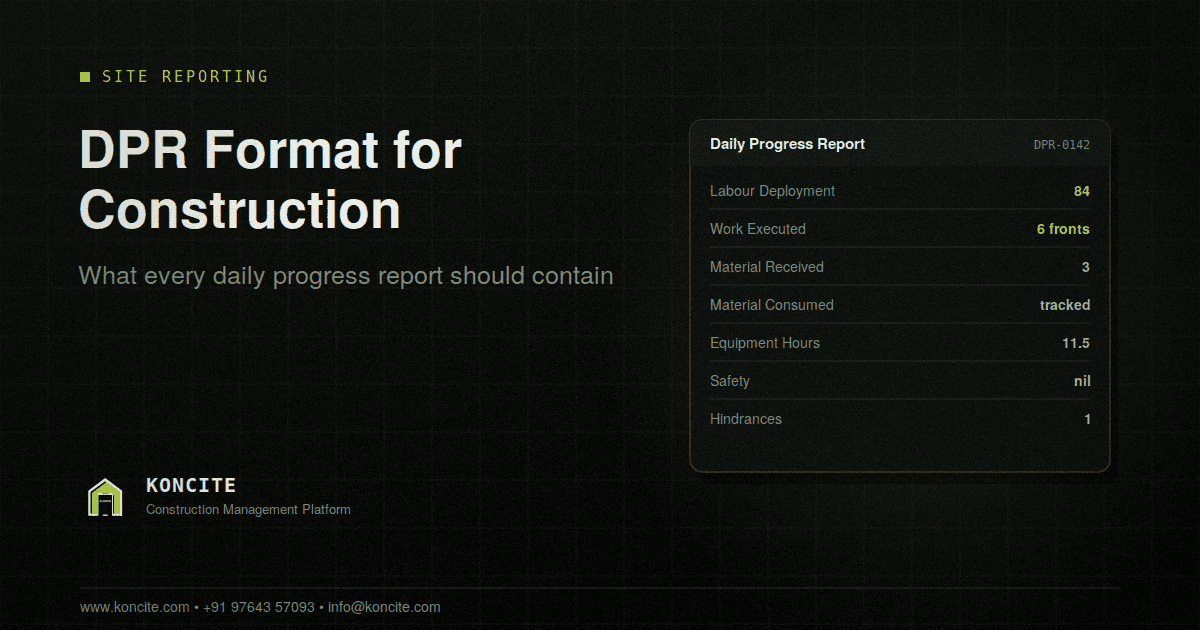
Here is a full DPR structure. Not every project needs every section, but this is the complete list to work from.
1. Project and Report Header
Basic identification, but get it right because this is what makes the report searchable later.
- Project name and site location
- Report date and day
- Report number or serial number
- Prepared by (name and designation)
- Weather condition and any working hours lost to weather
Weather sounds minor until you need to justify a delay claim. Then it becomes one of the most important lines in the report.
2. Labour Deployment
Record people by category and by contractor, not just a single total.
| Contractor / Agency | Skilled | Unskilled | Supervisors | Total |
|---|---|---|---|---|
Break skilled labour further where it matters on your project: mason, carpenter, bar bender, fitter, electrician, plumber, painter, helper.
This section is where most payment disputes get settled. A single number like “84 workers” tells you almost nothing three months later. A contractor wise breakdown tells you everything.
3. Work Executed Today
This is the heart of the report, and the section most often filled badly.
| Activity | Location / Block | Unit | Quantity Done | Cumulative to Date |
|---|---|---|---|---|
Three rules for this section:
Be specific about location. “Slab work” is not useful. “Slab casting, Tower A, 4th floor, Grid 5 to 9” is useful.
Always use quantities with units. Cubic metres, square metres, running metres, numbers. Descriptions without quantities cannot be tracked or billed.
Keep a cumulative column. Today’s figure alone does not tell you whether you are ahead or behind. The running total does.
4. Material Received
| Material | Unit | Quantity Received | Supplier | Challan / GRN Number | Remarks |
|---|---|---|---|---|---|
Record the challan or GRN number every time. Without it, reconciling site records against purchase records at month end becomes guesswork.
5. Material Consumed
| Material | Unit | Opening Stock | Received | Consumed | Closing Stock |
|---|---|---|---|---|---|
Many sites skip this section entirely, then wonder at month end why the material reconciliation does not match. Daily consumption tracking is the only reliable way to catch wastage or pilferage while it is still happening.
6. Machinery and Equipment
| Equipment | Number Deployed | Working Hours | Idle Hours | Reason for Idling |
|---|---|---|---|---|
Idle hours matter as much as working hours. Rented equipment sitting unused is a direct cost, and the reason column is what tells you whether the problem is planning, breakdown, or something else.
7. Safety
- Safety incidents or near misses, with description
- Toolbox talk conducted, and topic
- Any safety observations or violations noted
- Corrective action taken
Even on days with nothing to report, write “nil”. A blank looks like the section was ignored, and on projects with a formal safety audit, gaps become a real problem.
8. Hindrances and Delays
| Hindrance | Activity Affected | Duration Lost | Reason | Action Taken |
|---|---|---|---|---|
This is the section that protects you commercially. If work stopped because a drawing was awaited, or the client had not cleared access, or material did not arrive, that has to be recorded on the day it happened. Reconstructing it later during a claim discussion is far weaker.
9. Instructions Received
Anything the client, consultant, architect, or structural engineer instructed on site that day. Who gave it, what was said, and what needs to happen next.
Verbal instructions on site have a way of being forgotten by whoever gave them. Writing them into the DPR is how they become real.
10. Site Visitors
Name, organisation, and purpose of visit. Short section, occasionally very valuable.
11. Photographs
At least a few dated photographs of the day’s key work fronts. Photos remove a huge amount of argument later, and they take almost no effort to capture.
12. Planned Work for Tomorrow
| Activity | Location | Target Quantity | Resources Required |
|---|
Without this, your DPR is only a history. With it, the report becomes a planning tool, because tomorrow you can compare planned against actual and immediately see the gap.
13. Signatures
Prepared by, checked by, and approved by. On projects with a client or consultant presence, their acknowledgement carries weight if the report is ever used commercially.
Five Mistakes That Make a DPR Useless
Filling it from memory at night. By evening the engineer is reconstructing the day from vague recall. Details vanish, small problems go unrecorded, and the report becomes an approximation of what happened rather than a record of it. Fill it as work happens, or as close to that as possible.
Writing activities without quantities. “Brickwork continued” cannot be measured, tracked, or billed. Every activity line needs a number and a unit.
Leaving hindrances blank. Teams often skip this section because reporting a problem feels like reporting a failure. It is the opposite. A hindrance recorded on the day it happened is protection. A hindrance remembered three months later during a dispute is just an argument.
No cumulative figures. Daily numbers alone hide slippage. You only see a project falling behind when you look at running totals against the plan.
Different formats on different sites. When each site uses its own version, nothing can be compared or consolidated. Management ends up manually reformatting everything, which is why so many monthly reviews are spent assembling data instead of discussing it.
Should You Use Excel or Something Else?
Excel is where most teams start, and for a single site it works reasonably well. The problems appear as you grow.
Every site keeps its own file. Versions multiply. Someone has to collect and merge them. Cumulative totals are recalculated by hand and quietly go wrong. Photographs live somewhere else entirely, usually in a chat group. By the time management sees a consolidated picture, it is days old.
The practical test is simple. If pulling a current status across all your active sites takes more than a few minutes, your reporting format has outgrown the tool you are keeping it in.
Purpose built daily progress report software solves this by capturing the report at site, on a phone, as the work happens. Quantities, labour, material, photographs, and hindrances all go in once, and the consolidated view updates on its own. The format below stays exactly the same. Only the effort of maintaining it changes.
Frequently Asked Questions
What is the full form of DPR in construction? DPR stands for Daily Progress Report. It is the daily record of work executed, labour deployed, material used, equipment used, and any delays or safety incidents on a construction site.
Who prepares the DPR on a construction site? Usually the site engineer or site supervisor prepares it, and the project manager or planning engineer checks and approves it. On projects with a client or consultant on site, they may also countersign it.
What is the difference between a DPR and a daily site report? In practice they mean the same thing. Different organisations use different names for the same document.
Should photographs be part of a DPR? Yes. Dated photographs of the day’s main work fronts take very little effort and remove a large amount of disagreement later, particularly around quantities and completion dates.
How detailed should a DPR be? Detailed enough that someone who was not on site can understand exactly what happened, and specific enough that every activity carries a location, a quantity, and a unit. Beyond that, more detail rarely adds value and makes the report less likely to be filled properly.
In Short
A good DPR format is not about filling more columns. It is about capturing the few things that genuinely matter: what was done, where, how much, by whom, with what material, and what got in the way.
Get those right, fill it while the day is still fresh rather than from memory at night, and use the same format across every site. That alone puts most construction teams well ahead of where they were.